

.jpg)
As AI adoption accelerates inside enterprises, security and IT teams are increasingly asking a foundational question: what exactly is connected to our AI, and what can it access? For organizations running Claude Enterprise, Salt now has a direct answer. Salt Claude Connect links Salt to Claude’s Compliance API and provides continuous, read-only visibility into the MCP (Model Context Protocol) servers connected to your Claude Enterprise organization.
What Is Salt Claude Connect?
Salt Claude Connect integrates Salt with Claude’s Compliance API and reads your organization’s Activity Feed. It automatically surfaces the organization-managed MCP servers in your Salt AI inventory, giving security teams a live, always-current picture of which MCP servers are connected to Claude Enterprise, when they were added or removed, and their current status.
Critically, the connection is narrow by design. Salt requires a single read-only scope, read:compliance_activities. It never sends prompts to Claude, and it never reads chat content, file content, or project data. The only information Salt stores is MCP server lifecycle events.
What the Connector Discovers
Understanding the scope of discovery is important for setting expectations correctly.
What Salt discovers:
- Organization-level MCP connectors: servers that an administrator has added to your Claude Enterprise organization’s connector directory
- Server name, identity, and lifecycle: when a server was added, updated, or removed
- Current status: active vs. removed
MCP servers that individual users install locally run on the user’s own device and are not reported to Claude’s Compliance API. This is a constraint of the Compliance API itself, not a Salt limitation. If a server you expect to see isn’t appearing in your inventory, the first thing to check is whether it was added at the organization level or configured locally by a user.
How It Works: The Technical Architecture
Salt Claude Connect authenticates to Claude’s Compliance API using a Compliance Access Key scoped to read:compliance_activities. Salt polls the Activity Feed on a regular cycle. Each activity in the feed carries an organization_uuid that identifies your organization, plus metadata about the MCP server lifecycle event (server name, event type, timestamp).
The credential itself is stored encrypted and used only to authenticate against the Compliance API endpoint at https://api.anthropic.com. No other data is sent or received.
Setup: Four Steps to Connect
Getting the connector running requires a Claude Enterprise organization and Owner or Primary Owner permissions to create a Compliance Access Key.
Step 1: Create a Compliance Access Key
In claude.ai, sign in as an Owner or Primary Owner and navigate to Organization Settings > Data and Privacy > Compliance access keys. Create a new key and grant it the read:compliance_activities scope. This is the only scope required. Copy the key value (it begins with sk-ant-...) and store it securely.
Step 2: Find your Organization ID
Your Organization ID is a UUID that identifies your organization to Salt. You can read it from your Claude organization settings, or confirm it by calling the Compliance API directly:
Shell
curl -s "https://api.anthropic.com/v1/compliance/activities?limit=1" \
-H "x-api-key: <your-compliance-access-key>"
The organization_uuid field on any returned activity is your Organization ID.
Step 3: Add the connector in Salt
Open the Data Source Hub in the Salt dashboard, click the Claude Connect tile, and enter your Compliance Access Key, your Organization ID (UUID), and optionally an API Base URL (the default https://api.anthropic.com is correct for most organizations). Click Connect.
Salt validates the key and runs an initial discovery scan. On success, the connector status changes to Connected.
Step 4: Review your MCP servers
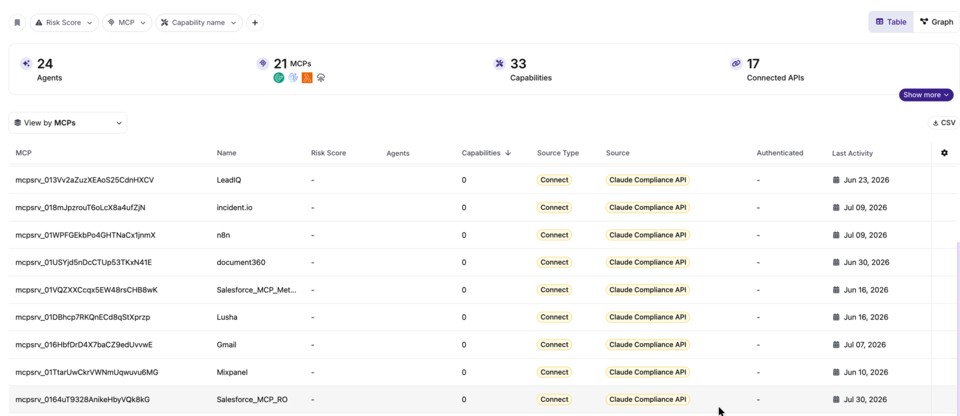
Discovered servers appear in your Salt Agentic inventory, labeled with the source Salt Claude Connect. Each entry shows server name, status, and the time of its most recent lifecycle event. From there, the connector is self-maintaining: it polls the Activity Feed continuously and reflects newly added, updated, or removed connectors, typically within one polling cycle.
Security and Privacy Properties
The connector is built around least-privilege access:
- Read-only: Salt only reads MCP server lifecycle activity. It never modifies your Claude organization.
- Single scope: Only
read:compliance_activitiesis requested. No content scopes are used or available. - No content access: Chats, files, projects, and prompts are never read.
- Encrypted credentials: Your Compliance Access Key is stored encrypted and used only to authenticate to the Compliance API.
How fresh is the data? The inventory refreshes each polling cycle. Changes to your organization's connectors are reflected shortly after they occur.
Salt Security is the leader in agentic and API security. To learn more, visit our platform page on our website, request a demo, or contact us.