

See what’s connected to Claude.
Gain continuous visibility into organization-managed MCP servers connected to your Claude Enterprise organization, without agents, traffic analysis, or manual inventory. Know what’s connected and when it changes.
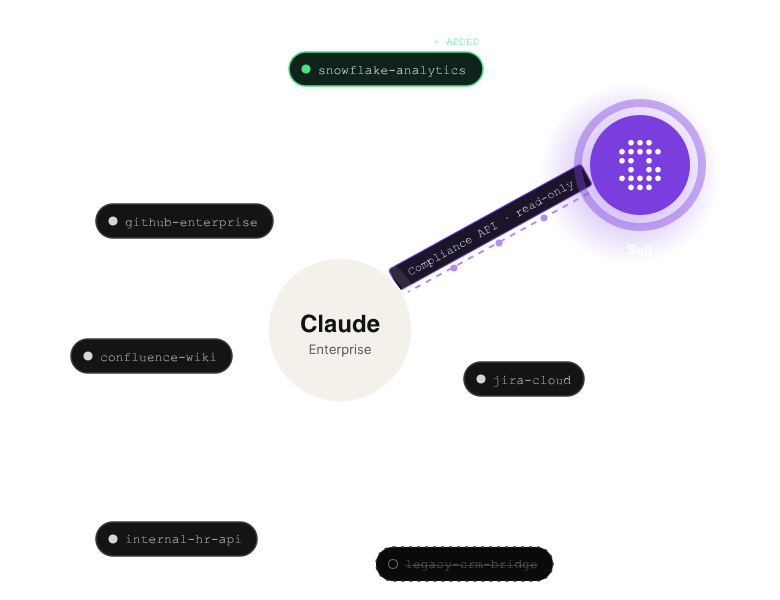
AI is connecting to more of your business. Security needs to see those connections.
MCP servers give Claude access to internal tools, databases, APIs, and external services. As organizations expand their use of Claude Enterprise, the number of these connections can grow quickly.
But security teams may lack a centralized, continuously updated view of what is connected. Manual reviews provide only a point-in-time picture, leaving unexpected or misconfigured MCP servers harder to identify.
Salt Claude Connect gives security and IT teams continuous visibility into organization-managed MCP servers, so they can understand what Claude is connected to and quickly see when something changes.
Continuous MCP discovery for Claude Enterprise.
Salt Claude Connect integrates Salt directly with Claude’s Compliance API to continuously discover organization-managed MCP servers.
Once connected, Salt maintains an always-current inventory showing which MCP servers are present, when their configuration last changed, and whether they are active or removed.
No agents. No traffic mirroring. No manual exports.
Feature highlights:

Know what’s connected
Automatically discover
organization-managed MCP servers and bring them into your Salt agentic inventory.

See when something changes
Track MCP server lifecycle events, including when servers are added, updated, or removed, typically within one polling cycle.

Identify unexpected connections faster
See server identity, status, and the time of the most recent lifecycle event, giving security teams the context to investigate new or unexpected connections.

Strengthen governance
Maintain a continuously updated, timestamped record of MCP server activity to support security governance and compliance requirements.
See MCP servers as part of your agentic attack surface.
Securing agentic AI starts with understanding what it can reach.
Salt agentic inventory
Claude Compliance API
Claude MCP
servers
Inventory
APIs
Inventory
Hosts
Inventory
Other agentic surfaces
Salt brings discovered Claude MCP servers into the same agentic inventory as APIs, hosts, and other agentic surfaces, giving security teams a more unified picture of the systems connecting AI to enterprise resources.
Instead of treating MCP connections as another isolated inventory, teams can bring them into their broader view of the agentic attack surface.
Explore Salt Agentic SecurityPrivacy Visibility without visibility into your conversations.
Getting security visibility should not mean giving another system access to sensitive AI interactions.
Salt Claude Connect is deliberately narrow in what it accesses. It requires only a Compliance Access Key scoped to read:compliance_activities, which it uses to retrieve MCP server lifecycle events.
Your Compliance Access Key is stored encrypted and used only to authenticate against the configured Compliance API endpoint.
Salt Claude Connect does not:
You get visibility into the connections, not the conversations.
From Claude to Salt in four simple steps.
Get continuous MCP server visibility up and running in minutes with a Claude Enterprise organization and Owner or Primary Owner permissions.
01 Create a Compliance Access Key
Create a key in Claude organization settings using the read:compliance_activities
scope.
02 Find your Organization ID
Identify the UUID associated with your Claude organization.
03 Connect Claude to Salt
Open the Salt Data Source Hub, select Claude Connect, and enter your Compliance Access Key and Organization ID. Salt validates the key and runs an initial discovery scan. On success, the connector status changes to Connected.
04 See your MCP inventory
Discovered servers appear in your Salt agentic inventory. Salt then continuously polls the Activity Feed and reflects newly added, updated, or removed connectors automatically.
Know what Salt sees,
and what it doesn’t.
Visible in Salt (Organization-managed MCP connectors)
Salt Claude Connect discovers organization-managed MCP connectors added by administrators, including:
- Server name and identity
- Unique identifier
- Added, updated, and removed lifecycle events
- Current active or removed status
- Timestamp of the most recent lifecycle event
Not visible in Salt
Salt Claude Connect does not store or process:
- Chat content or prompts
- Project or file data
- User-level activity
- Personal workspace data
Salt Claude Connect cannot discover:
- Locally installed MCP servers running on individual devices, which are not reported through Claude’s Compliance API
- Organization MCP servers with no lifecycle activity recorded within the Compliance API's retention window
Turn MCP visibility into stronger AI governance.
As AI becomes connected to more enterprise systems, knowing what it can access becomes a foundational security requirement.
Salt Claude Connect continuously inventories organization-managed MCP servers connected to Claude Enterprise, helping security teams replace point-in-time reviews with an always-current view of their expanding agentic attack surface.
See what’s connected. Know when it changes.
Always-current MCP visibility for Claude Enterprise, live in minutes.