

Découvrez ce qui est connecté à Claude.
Bénéficiez d'une visibilité continue sur les serveurs MCP gérés par votre organisation et connectés à votre compte Claude Enterprise, sans agents, analyse de trafic ou inventaire manuel. Sachez exactement ce qui est connecté et suivez chaque changement en temps réel.
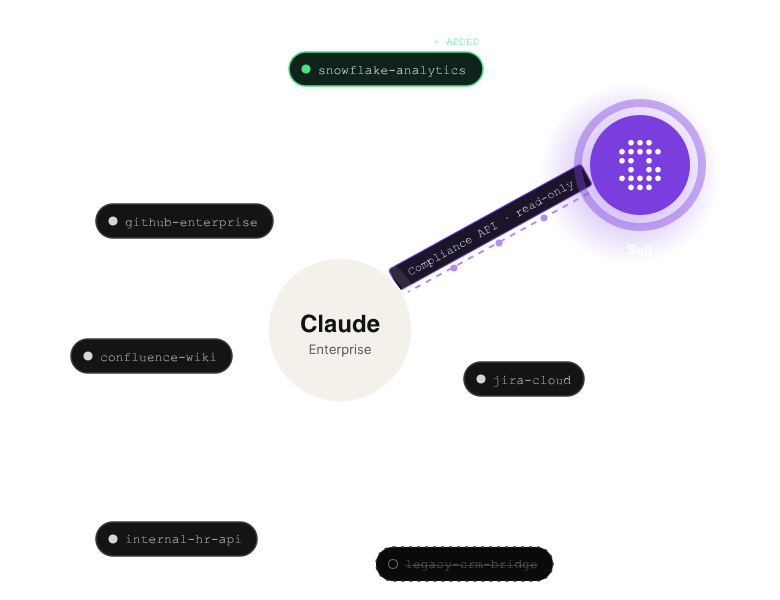
L'IA s'intègre de plus en plus à vos activités. La sécurité doit pouvoir superviser ces connexions.
Les serveurs MCP donnent à Claude accès à des outils internes, des bases de données, des API et des services externes. À mesure que les organisations étendent leur utilisation de Claude Enterprise, le nombre de ces connexions peut croître rapidement.
Cependant, les équipes de sécurité peuvent manquer d'une vue centralisée et mise à jour en continu des connexions. Les examens manuels ne fournissent qu'une image ponctuelle, rendant plus difficile l'identification des serveurs MCP inattendus ou mal configurés.
Salt Claude Connect offre aux équipes de sécurité et informatiques une visibilité continue sur les serveurs MCP gérés par l'organisation, leur permettant de comprendre à quoi Claude est connecté et de détecter rapidement tout changement.
Découverte MCP continue pour Claude Enterprise.
Salt Claude Connect intègre directement Salt à l'API de conformité de Claude pour découvrir en continu les serveurs MCP gérés par l'organisation.
Une fois connecté, Salt maintient un inventaire toujours à jour indiquant quels serveurs MCP sont présents, quand leur configuration a été modifiée pour la dernière fois, et s'ils sont actifs ou supprimés.
Sans agent. Sans mise en miroir du trafic. Sans export manuel.
Points forts :

Sachez ce qui est connecté
Découvrez automatiquement les serveurs MCP gérés par l'organisation et intégrez-les à votre inventaire agentique Salt.

Détectez les changements en temps réel
Suivez les événements du cycle de vie des serveurs MCP, notamment leur ajout, leur mise à jour ou leur suppression, généralement en un cycle d'interrogation.

Identifiez plus rapidement les connexions inattendues
Visualisez l'identité, le statut et l'heure du dernier événement de cycle de vie des serveurs, offrant aux équipes de sécurité le contexte nécessaire pour enquêter sur les connexions nouvelles ou inattendues.

Renforcez la gouvernance
Maintenez un registre horodaté et mis à jour en continu de l'activité des serveurs MCP pour répondre aux exigences de gouvernance de sécurité et de conformité.
Considérez les serveurs MCP comme faisant partie de votre surface d'attaque agentique.
Sécuriser l'IA agentique commence par comprendre ce à quoi elle peut accéder.
Inventaire agentique Salt
API de conformité Claude
Serveurs
MCP Claude
Inventaire
API
Inventaire
Hôtes
Inventaire
Autres surfaces agentiques
Salt intègre les serveurs MCP Claude découverts dans le même inventaire agentique que les API, les hôtes et les autres surfaces agentiques, offrant aux équipes de sécurité une vue plus unifiée des systèmes reliant l'IA aux ressources de l'entreprise.
Au lieu de traiter les connexions MCP comme un inventaire isolé, les équipes peuvent les intégrer à leur vision globale de la surface d'attaque agentique.
Explorer la sécurité agentique de SaltConfidentialité Une visibilité sans accès à vos conversations.
Obtenir une visibilité sur la sécurité ne devrait pas signifier donner à un autre système l'accès à des interactions d'IA sensibles.
Salt Claude Connect est délibérément limité dans ce à quoi il accède. Il nécessite uniquement une clé d'accès de conformité limitée à read:compliance_activities, qu'il utilise pour récupérer les événements du cycle de vie du serveur MCP.
Votre clé d'accès de conformité est stockée de manière chiffrée et utilisée uniquement pour l'authentification auprès du point de terminaison de l'API de conformité configuré.
Salt Claude Connect ne peut pas :
Vous obtenez une visibilité sur les connexions, pas sur les conversations.
De Claude à Salt en quatre étapes simples.
Bénéficiez d'une visibilité continue sur vos serveurs MCP en quelques minutes avec une organisation Claude Enterprise et des autorisations de propriétaire ou de propriétaire principal.
01 Créez une clé d'accès de conformité
Créez une clé dans les paramètres de l'organisation Claude en utilisant la portée read:compliance_activities.
02 Trouvez votre identifiant d'organisation
Identifiez l'UUID associé à votre organisation Claude.
03 Connectez Claude à Salt
Ouvrez le hub de sources de données Salt, sélectionnez Claude Connect, puis saisissez votre clé d'accès de conformité et votre identifiant d'organisation. Salt valide la clé et lance une analyse de découverte initiale. Une fois l'opération réussie, le statut du connecteur passe à Connecté.
04 Consultez votre inventaire MCP
Les serveurs détectés apparaissent dans votre inventaire d'agents Salt. Salt interroge ensuite en continu le flux d'activité et reflète automatiquement les connecteurs ajoutés, mis à jour ou supprimés.
Sachez ce que Salt voit,
et ce qu'il ne voit pas.
Visible dans Salt (Connecteurs MCP gérés par l'organisation)
Salt Claude Connect détecte les connecteurs MCP gérés par l'organisation et ajoutés par les administrateurs, notamment :
- Nom et identité du serveur
- Identifiant unique
- Événements de cycle de vie ajoutés, mis à jour et supprimés
- Statut actuel actif ou supprimé
- Horodatage du dernier événement de cycle de vie
Hors périmètre
Salt Claude Connect ne stocke ni ne traite :
- Contenu des discussions ou prompts
- Données de projet ou de fichier
- Activité au niveau de l'utilisateur
- Données d'espace de travail personnel
Salt Claude Connect ne peut pas découvrir :
- Serveurs MCP installés localement sur des appareils individuels, qui ne sont pas signalés via l'API de conformité de Claude
- Serveurs MCP de l'organisation sans activité de cycle de vie enregistrée dans la fenêtre de rétention de l'API de conformité
Transformez la visibilité MCP en une gouvernance de l'IA renforcée.
À mesure que l'IA se connecte à davantage de systèmes d'entreprise, savoir à quoi elle peut accéder devient une exigence de sécurité fondamentale.
Salt Claude Connect inventorie en continu les serveurs MCP gérés par l'organisation et connectés à Claude Enterprise, permettant aux équipes de sécurité de remplacer les audits ponctuels par une vue toujours à jour de leur surface d'attaque agentique en pleine expansion.
Voyez ce qui est connecté. Sachez quand cela change.
Une visibilité MCP toujours à jour pour Claude Enterprise, opérationnelle en quelques minutes.